Compliance Strategy
How to Use ChatGPT Safely at Work (2026 Practical Guide)
How to Use ChatGPT Safely at Work (2026 Practical Guide)
Your team is already using ChatGPT. Every day. For drafting emails, summarizing meeting notes, reviewing contract language, and researching topics they do not have time to read about themselves. This is not a future scenario -- it is the present state of work in most knowledge-economy companies. The real question is not whether ChatGPT is safe for business, but whether your team is using it in a way that is GDPR compliant.
The numbers confirm it. Cyberhaven's 2024 AI Adoption Report, based on actual usage data from three million workers, found that 27.4 percent of all data employees input into AI tools qualifies as sensitive -- client information, source code, legal documents, financial data. Even more concerning: 73.8 percent of ChatGPT usage at work happens through personal, non-corporate accounts. This shadow AI problem means the majority of company data flowing into AI tools is going through channels that offer no enterprise data protection whatsoever.
The question for any organization is no longer whether employees should use AI. They already do. The question is how to make that usage safe -- how to achieve effective chatgpt data leak prevention -- without killing the productivity gains that made people adopt these tools in the first place.
This guide walks through the specific risks, a practical manual workflow for safe usage (including how to anonymize data for ChatGPT), and how to automate that workflow so it actually sticks in day-to-day practice.
Five Common Scenarios Where Data Leaks Happen
These are not edge cases. They are things that happen in offices, consulting firms, hospitals, and law practices every single day.
1. Pasting client emails for summarization
The scenario: A consultant copies an entire email thread with a client into ChatGPT and asks for a summary of action items.
What leaks: Full names, email addresses, phone numbers, company names, project details, possibly contract terms and pricing. Every identifiable data point in that email thread is now on OpenAI's servers.
Why it matters: Under GDPR and similar data protection frameworks, each of those data points is personal data. Sending them to a US-based AI provider constitutes a cross-border data transfer -- one that most employees do not realize they are making. (For a deeper analysis of this legal reality, see our post on why every ChatGPT prompt is a data transfer.)
2. Uploading contract excerpts for review
The scenario: Someone in legal pastes three paragraphs from a client agreement into ChatGPT to check whether a liability clause is standard.
What leaks: Party names, contract values, specific terms, confidentiality clauses. The irony is hard to miss: the confidentiality clause itself gets sent to a third party in the process of checking whether it is adequate.
Why it matters: Beyond personal data regulations, this can breach contractual confidentiality obligations and, for attorneys, professional privilege requirements that exist in virtually every jurisdiction.
3. Entering patient or customer names in prompts
The scenario: An insurance claims processor types: "Summarize the claim for John Smith, DOB March 15, 1982, policy number UK-4839201, regarding water damage at 14 Elm Street, Manchester."
What leaks: Full name, date of birth, policy number, home address -- all directly identifiable, all personal data. If the claim involves health information, it falls into the special category of sensitive data that carries the highest protection requirements under GDPR (Article 9) and equivalent regulations worldwide.
Why it matters: Health-adjacent and financial data breaches carry the steepest regulatory penalties and the highest reputational damage. A single prompt can constitute a reportable data breach.
4. Sharing internal project details for brainstorming
The scenario: A product manager gives ChatGPT a detailed project brief -- including codenames, timelines, budgets, and strategic objectives -- and asks for suggestions on the communication strategy.
What leaks: Internal project codenames, budget figures, strategic plans, market entry timelines. Not personal data in the strict sense, but trade secrets and commercially sensitive information.
Why it matters: In the EU, trade secrets can lose their protected status under the Trade Secrets Directive if disclosed without reasonable protective measures. A prompt to ChatGPT could be argued as an unprotected disclosure. Similar principles apply under the US Defend Trade Secrets Act and equivalent legislation in other jurisdictions.
5. Leaking API keys and secrets in code prompts
The scenario: A developer pastes a configuration file or code snippet into ChatGPT to debug an issue -- without noticing that the same snippet contains a hardcoded API key, a database password, or a connection string.
What leaks: Production credentials -- API keys, database URLs, OAuth secrets, internal service endpoints. Cyberhaven's data shows that source code accounts for 12.7 percent of all sensitive data entered into AI tools. The real danger is less the code itself than the secrets embedded in it.
Why it matters: A single leaked API key can be enough to access production databases, cloud infrastructure, or payment systems. Unlike an accidentally submitted client name, a compromised key cannot be undone by deleting the chat -- it must be rotated, and until then there is an open security vulnerability.
Where Does Your Data Actually Go? Provider Retention Policies in 2026
Before proceeding to solutions, it is worth understanding what happens to data after it enters these tools. The policies differ significantly between free and enterprise tiers.
Provider | Free/Plus tier | Enterprise tier | Source |
|---|---|---|---|
OpenAI (ChatGPT) | Stored indefinitely, may be used for model training. Free users cannot disable chat history since 2024. Deleted chats removed within 30 days. | Not used for model training. Zero Data Retention available. | |
Anthropic (Claude) | 30-day retention by default. Opt-in to training: up to 5 years. API data deleted after 7 days, never used for training. Safety-flagged prompts may be stored up to 2 years. | Not used for training. API with zero retention available. | |
Google (Gemini) | May be used for model improvement, reviewed by human evaluators. Retained up to 3 years, even after account disconnection. | Not used for training. No human review without explicit consent. |
The bottom line: On free tiers -- which is what most shadow AI usage runs on -- your data is stored, potentially used for training, and may be seen by human reviewers. Enterprise plans offer better protection, but the majority of employees are not using the enterprise version.
The regulatory clock is ticking. The EU AI Act enters its next enforcement phase in August 2026, introducing transparency and AI governance obligations for organizations deploying AI systems. Companies that use general-purpose AI tools like ChatGPT in their workflows will need to demonstrate that they have appropriate AI governance measures in place -- including policies for how employees interact with these systems. An internal AI usage policy is no longer a nice-to-have; it is becoming a regulatory expectation.
Step-by-Step: How to Use ChatGPT Safely (The Manual Method)
The core principle is straightforward: remove identifiable and sensitive data from your prompt before you send it. Here is how to do it manually.
Step 1: Review your prompt before sending
Read through your prompt and identify every piece of information that could identify a person, company, or internal detail -- names, addresses, account numbers, dates of birth, project codenames, financial figures.
Step 2: Replace sensitive data with typed placeholders
Swap identifiable data for consistent, typed placeholders:
Original data | Placeholder |
|---|---|
John Smith | [PERSON_1] |
Acme Corporation | [COMPANY_1] |
[EMAIL_1] | |
14 Elm Street, Manchester | [ADDRESS_1] |
GB82 WEST 1234 5698 7654 32 | [IBAN_1] |
Example:
Before: "Summarize the open items from the email from Thomas Schneider at Schneider & Partners Ltd. He asked on March 15 whether we can extend the maintenance contract (contract no. MC-2026-0847) for another year."
After: "Summarize the open items from the email from [PERSON_1] at [COMPANY_1]. He asked on [DATE_1] whether we can extend the maintenance contract (contract no. [CONTRACT_1]) for another year."
Step 3: Send the sanitized prompt
Submit the cleaned prompt to ChatGPT. The AI works just as well with placeholders as with real data -- it does not need the actual name to summarize an email or review a clause.
Step 4: Review the response and restore placeholders
Replace the placeholders in the AI's response with the original data before using or sharing the output.
Step 5: Delete chats containing sensitive content
If you used a prompt without sanitizing it first, delete the chat. On free OpenAI accounts, deleted conversations are removed within 30 days.
The problem with the manual method: It works. But it is tedious. At five to ten prompts per day, the find-and-replace routine becomes a burden. And it only takes one forgotten substitution -- a single prompt sent in a hurry -- to transmit data irreversibly to a third-party server.
The Automated Alternative: Browser-Based Anonymization
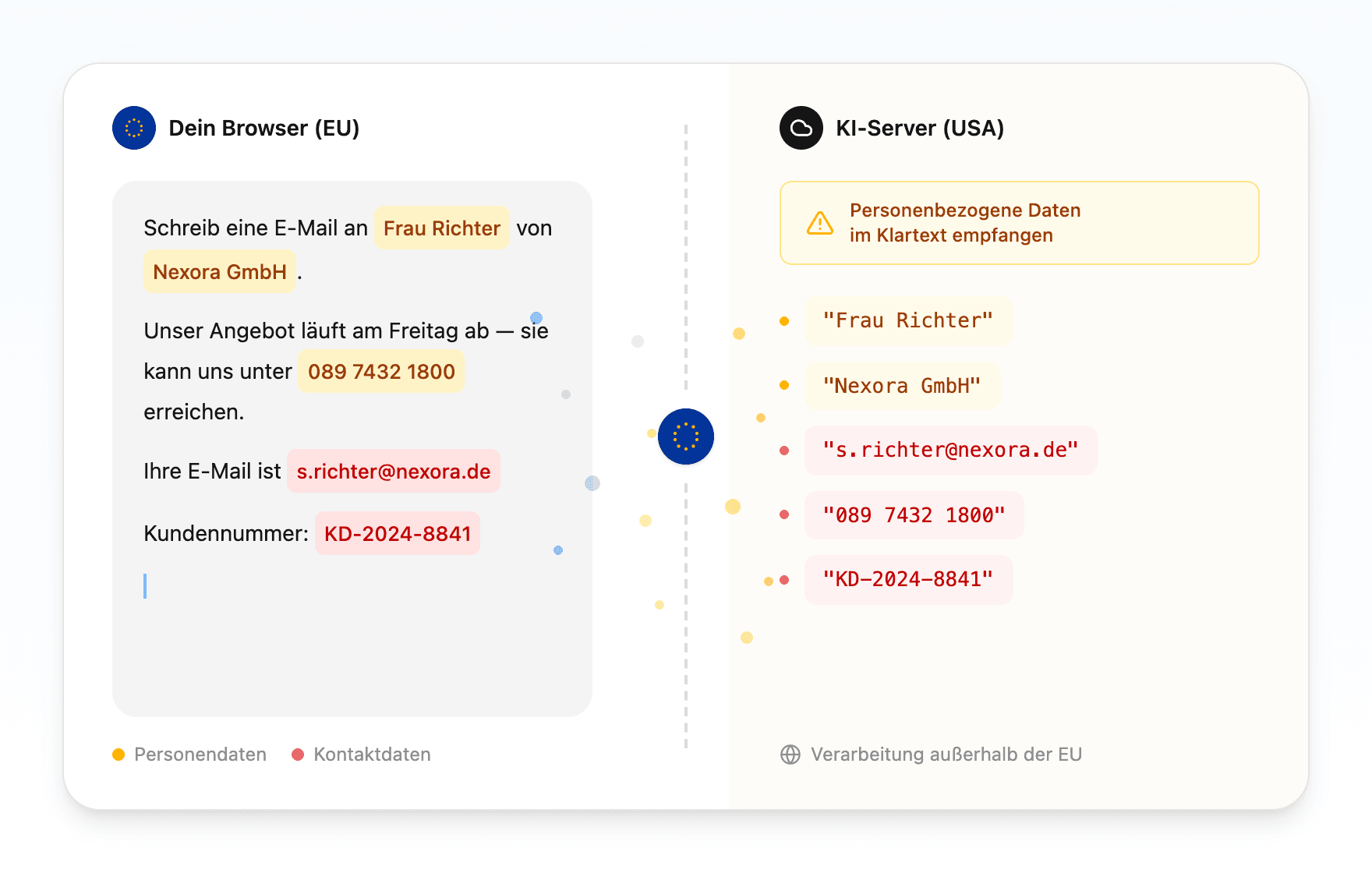
The manual workflow described above can be fully automated -- directly in the browser, without data ever leaving your device.
How the automated cycle works:
You type your prompt normally in ChatGPT, Claude, or Gemini -- with real names, addresses, contract details. No change to your workflow.
Before the prompt is sent, a local AI model (an ONNX Named Entity Recognition model running directly in the browser via WebAssembly) detects all personal and sensitive data in the text.
Detected data is replaced with typed placeholders. Only the anonymized prompt is transmitted to the AI provider. The mapping table -- which placeholder corresponds to which original data point -- stays encrypted on your device using AES-256-GCM encryption.
The AI response comes back containing the placeholders.
Placeholders are automatically replaced with the original data (the "rehydration" step). You see the complete response with the correct names and details, but the AI provider never saw them.
The critical point: The NER model runs locally in your browser. No cloud service, no proxy server, no data sent anywhere for the anonymization step itself. The privacy protection happens on your machine, before anything leaves it.
This is exactly what the manual method achieves -- sanitize, send, receive, restore -- without the daily effort and without the human error rate.
AI Usage Policy Template for Your Team
The following template can serve as a starting point for an internal AI usage policy. Adapt it to your organization's industry, jurisdiction, and existing data protection framework.
1. Scope
Which employees and departments does this policy cover?
Which AI tools are included (ChatGPT, Claude, Gemini, Copilot, others)?
Does it apply to AI tools used for personal productivity, or only customer-facing work?
2. Permitted uses
Text drafting and editing (emails, summaries, translations)
Research and ideation
Code assistance (debugging, documentation, refactoring)
Data analysis (only with anonymized or synthetic datasets)
3. Prohibited inputs
Personal data (names, addresses, dates of birth, national ID numbers, social security numbers)
Health data and other special category data (GDPR Article 9 equivalent)
Client and customer information in identifiable form
Non-public financial data, contract details, and pricing information
Credentials, API keys, passwords, and access tokens
Source code covered by non-disclosure agreements or proprietary licenses
4. Anonymization requirement
All prompts referencing internal matters or client data must be anonymized before submission
Recommended method: use of a company-approved anonymization tool, or manual placeholder replacement
Responsibility for anonymization lies with the person submitting the prompt
5. Account requirements
AI tools must be accessed through company-provisioned accounts (enterprise or business tier) where available
Use of personal accounts for work-related AI queries is not permitted
Rationale: enterprise accounts exclude inputs from model training and provide audit capabilities
6. Documentation and accountability
AI-assisted work outputs that inform business decisions must be labeled as AI-assisted
Department heads maintain a register of AI tools in active use
7. Training and awareness
All employees complete annual training on safe AI usage
New employees are briefed on this policy during onboarding
This policy is reviewed quarterly as AI provider terms and regulatory requirements evolve
8. Incident reporting
Violations of this policy must be reported immediately to the Data Protection Officer or compliance lead
Unintentional submission of personal data to an AI tool should be treated as a potential data breach and handled according to your organization's breach notification procedures
Share this guide with your team lead or DPO -- they will thank you.
Quick-Wins Checklist: 6 Things You Can Do Today
Regardless of whether your organization has an AI policy or specialized data loss prevention tooling, these steps improve your data protection posture immediately:
Review your next prompt before hitting send. Read it once and ask: does this contain a name, an address, an account number, or an internal detail that should not leave the organization? If yes, replace it with a placeholder. This is the most basic form of data minimization.
Turn off model training in your AI tools. In ChatGPT: Settings > Data Controls > toggle off "Improve the model for everyone." In Gemini: myaccount.google.com > Data & Privacy > Gemini Apps Activity > turn off. This does not prevent storage, but it prevents your inputs from being used to train future models.
Use ChatGPT's temporary chat mode for sensitive work. Temporary chats are not saved to your history and are not used for model training. It is not a substitute for anonymization (the data still reaches OpenAI's servers), but it reduces the retention footprint.
Use a separate browser profile for AI tools. Create a dedicated browser profile without saved logins, autofill data, or cookies from your main work profile. This prevents AI tools from accessing your browser-side data stores.
Delete chats containing sensitive content after use. Even though deletion is not instant at OpenAI (30-day retention window), it reduces the period during which data is accessible and prevents accumulation of sensitive content in your chat history.
Ask your Data Protection Officer or compliance lead about an AI usage policy. If one does not exist yet, the template above is a good starting point for the conversation. If one does exist, read it -- many employees do not know their organization already has rules for AI governance.
Frequently Asked Questions
Is it safe to use ChatGPT at work?
ChatGPT can be used safely at work if you take precautions. The main risk is not the tool itself but uncontrolled usage: employees pasting personal data, client information, or proprietary code into prompts without anonymization. With an AI usage policy, enterprise-tier accounts, and prompt anonymization (manual or automated), ChatGPT becomes a safe and productive workplace tool.
Does ChatGPT use my data for training?
On free and Plus accounts, yes -- by default, your inputs may be used to train future models. On ChatGPT Enterprise and Business (Team) accounts, OpenAI does not use your data for training. You can turn off model training on free accounts under Settings > Data Controls, but this does not prevent data storage or potential human review.
How do I anonymize data for ChatGPT?
Replace all personal and sensitive data in your prompt with typed placeholders before sending: names become [PERSON_1], companies become [COMPANY_1], and so on. After receiving ChatGPT's response, swap the placeholders back to the original data. This can be done manually or automated with a browser extension like Rehydra that handles detection, replacement, and restoration in real-time.
What is shadow AI and why is it a risk?
Shadow AI refers to employees using AI tools like ChatGPT, Claude, or Gemini through personal accounts and outside the visibility of IT or compliance teams. Cyberhaven's research shows 73.8 percent of workplace ChatGPT usage happens through personal accounts. This means sensitive company data flows to AI providers without enterprise data protection, audit trails, or compliance controls -- creating GDPR, trade secret, and security risks that the organization cannot manage.
Do I need an AI usage policy for my company?
Yes. With the EU AI Act entering its next enforcement phase in August 2026, organizations deploying AI tools need documented AI governance measures. An AI usage policy defines which tools are approved, what data can and cannot be entered, and how employees should anonymize sensitive inputs. It protects the organization legally and gives employees clear guidance instead of an informal "just be careful."
The Bottom Line: AI Usage Is Not the Risk. Uncontrolled AI Usage Is.
ChatGPT, Claude, and Gemini are genuinely productive tools. Banning them is not realistic -- 73.8 percent of usage already happens through personal accounts, outside IT's visibility. The better strategy is to show people how to use these tools safely and give them the means to do so without adding friction to their day.
The manual method -- review, replace, send, restore -- works, but it is error-prone in daily practice. Browser-based anonymization automates exactly that process: privacy that does not break your AI workflow.
Want to automate this? The Rehydra browser extension anonymizes your prompts in real-time, directly in your browser. Free, open source, no IT setup required.
Install for Chrome | Install for Firefox
What is the riskiest thing you have ever seen pasted into ChatGPT at work? Let us know (anonymously) -- we are compiling data on shadow AI practices to bring real numbers to the conversation.